
7 Features a Modern POS System Must Have in 2026
Most POS vendors sell you on feature count. We break down the 7 features that actually matter in 2026 and 2 features you're probably paying for that you don't need yet.

Harshit Agarwal
PRINCIPAL ARCHITECT8 MIN READ
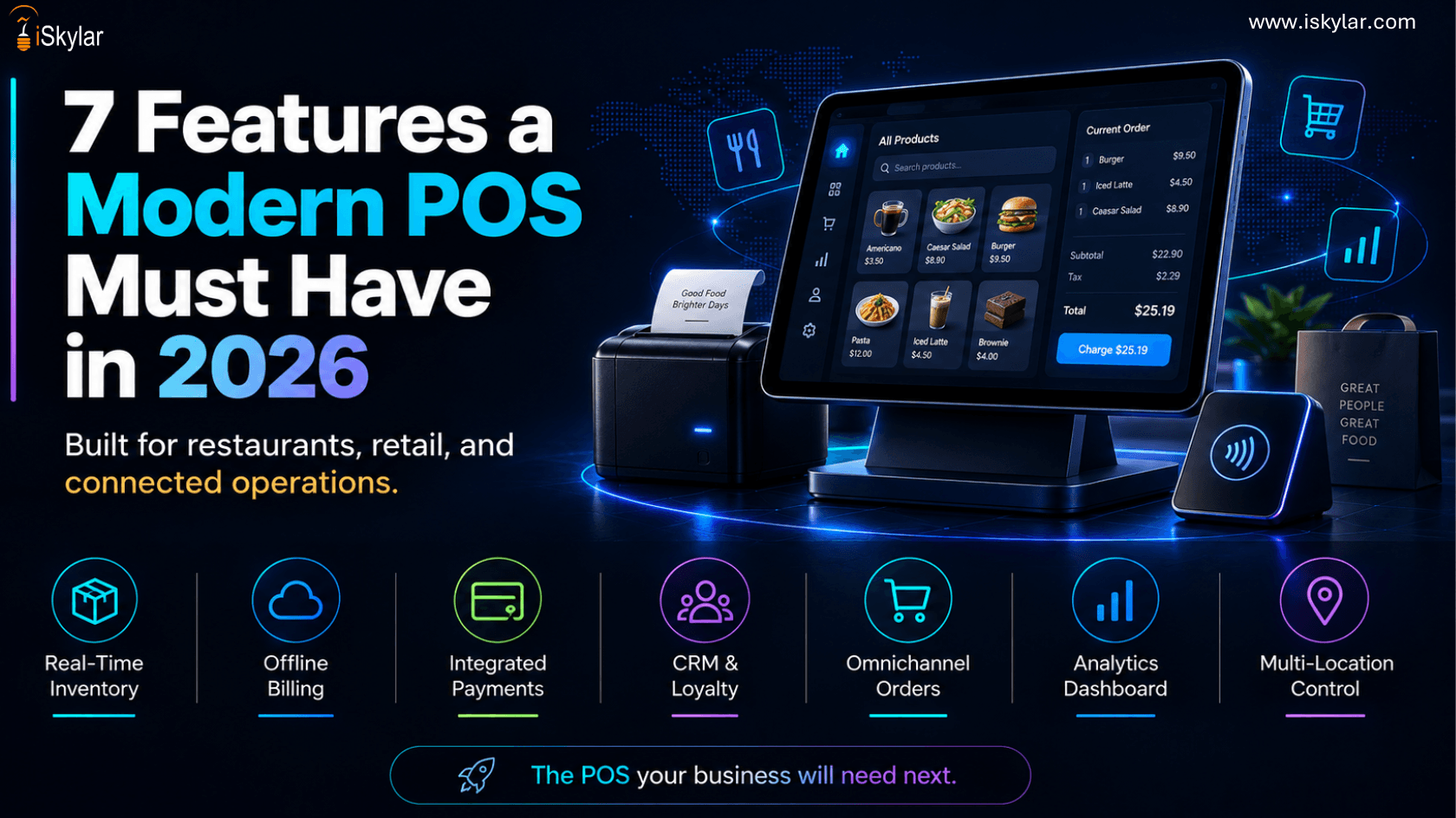
Walk into any POS vendor demo and you will see a feature list with 40+ items. Built-in workforce scheduling. Cryptocurrency payments. Customer sentiment analysis. AI-generated menu descriptions.
Most of it sounds useful in a slide deck. Most of it will not matter to your daily operations.
What matters is simpler: does the system work when the internet goes down? Does inventory update in real time? Can it connect to the tools you already use without a six-figure integration project?
pos software development team has seen what separates systems that actually help businesses run from systems that just look good in demos.
This guide covers seven must-have features for 2026 and two that vendors push hard but that most businesses do not actually need right now.
⚡ Quick note on scope: This guide is for retail, restaurant, and service businesses building or modernizing their POS not enterprise ERP projects. If you run more than 10 locations, some of the "skip for now" items may move up your list. The 7 Features Your POS System Must Have in 2026These are not optional add-ons or premium tier features. If your current system is missing even two of these, it is costing you money every day either in lost sales, staff time, or manual work that should not exist.
1. Hybrid Offline ModeYour internet will go down. That is not a question of if it is a question of when.A POS with true hybrid offline mode keeps processing transactions locally when connectivity drops. Everything syncs automatically when the connection comes back. No manual entry, no lost sales, no awkward conversations with customers. This sounds basic, but a surprising number of cloud-based POS systems still show an error screen the moment Wi-Fi drops. For a restaurant doing 200 covers on a Friday night, that is a disaster. What to look for: · Local transaction processing that works completely, not a "limited mode" · Automatic background sync when connectivity returns · Inventory updates reflected across all terminals after reconnection · Audit log of offline transactions for reconciliation
2. Real-Time Inventory SyncIf your POS and your inventory system are two separate things that sync once a day, you are always operating on stale data. Real-time inventory sync means every sale, every return, every wastage entry, and every stock transfer updates a single source of truth immediately. Not in a batch at midnight. For multi-location businesses, this is even more critical. When a customer asks whether the other store has something in stock, your team should know in five seconds not "let me check and call you back." What to look for: · Real-time stock deduction the moment a transaction completes · Low-stock alerts and automated reorder triggers · Transfer requests between locations from within the POS · Supplier purchase order integration
3. Open API LayerA POS that cannot talk to your other software is a dead end. You will either end up with manual data transfer between systems or an expensive custom integration every time you add a new tool. An open API layer means your POS can connect to your accounting software, e-commerce platform, loyalty program, analytics dashboard, and ERP without starting from scratch each time. This is one of the main reasons businesses come to us for custom POS software development services. They have already invested in tools that work they just need their POS to work with them, not against them. What to look for: · REST API with documented, versioned endpoints · Webhook support for real-time event triggers · Pre-built connectors for Shopify, QuickBooks, Xero, and major ERPs · Sandbox environment for testing integrations without touching live data 4. AI-Powered Analytics and Demand ForecastingThis is the feature that is pulling 2026 POS systems furthest ahead of the previous generation. Basic analytics tell you what happened. AI analytics tells you what is likely to happen next based on your historical sales, seasonal patterns, local events, and sometimes even weather data. For a restaurant operator, that means knowing on Monday that you will need 40% more salmon by Friday. For a retailer, it means avoiding the overstock that sits for three months and then gets marked down at a loss. Our AI POS software development services team builds demand forecasting directly into POS systems. Operators we have worked with have reduced over-ordering by 20–35% within the first two quarters after deploying forecasting. What to look for: · Sales trend analysis by product, category, time of day, and location · Automated reorder suggestions based on demand patterns · Staff scheduling recommendations tied to predicted footfall · Anomaly detection alerts when a product category spikes or drops unexpectedly
5. Multi-Location DashboardIf you run more than one location, logging into ten different systems to get a picture of your business is not a strategy. It is a time sink. A multi-location dashboard gives you real-time performance across all your stores or restaurants from one screen. You can compare revenue per location, spot underperformers before they become problems, and push price or menu updates to every location at once. This is a core requirement in most pos software development projects we handle for franchise operators and multi-unit restaurant groups. What to look for: · Consolidated real-time reporting across all locations · One-click drill-down into individual location data · Centralized menu and pricing management push changes everywhere at once · Role-based access control store managers see their store, you see everything 6. Mobile POS CapabilityFixed terminals belong in back offices. Your floor staff should be able to move. Mobile POS lets your team take orders at the table, check customers out in the queue before they reach the register, and process payments from anywhere on the floor using a tablet or a phone with a card reader. The business case is straightforward: reducing checkout friction increases throughput. One restaurant group we worked with reduced average transaction time by 40% after deploying tableside mobile POS. The same staff handled more covers per shift. We build native and cross-platform mobile POS development solutions that integrate fully with the main system not a separate app with a separate data silo. What to look for: · iOS and Android support · Compatibility with Bluetooth card readers Square, Stripe, Adyen · Full inventory visibility from the mobile device, not just basic checkout · Offline mode on mobile too, not just on fixed terminals
7. Digital Receipts and a Built-In Loyalty EngineThis is the cheapest customer retention tool available to any retail or restaurant business if your POS supports it natively. A built-in loyalty engine assigns points, tracks spending tiers, and sends automated offers without requiring a separate third-party subscription. Digital receipts capture email addresses at checkout and build your first-party customer list automatically. Businesses using native POS loyalty programs consistently see 15–25% higher repeat visit rates compared to those relying on paper punch cards or disconnected loyalty apps. What to look for: · Email and SMS receipt options presented at checkout · Points-based or spend-based loyalty tiers · Automated milestone offers birthdays, anniversaries, visit counts · Customer profile with full purchase history accessible at any terminal 2 Features You Are Probably Paying for That You Do Not Need YetEvery POS vendor has a premium tier that bundles in extra features to justify a higher price. Here are two that sound compelling in a sales pitch but rarely deliver ROI for most businesses right now.
1. Cryptocurrency PaymentsIf your customers are not actively asking to pay in crypto, this is a feature you are paying to support for close to zero usage. Crypto transaction volumes at physical retail and restaurant locations in the US remain well below 0.5% of total transactions. Add regulatory uncertainty at the state and federal level, and this becomes a feature that costs you money while creating compliance complexity. When does it make sense to add it? · You operate in a crypto-native sector gaming stores, NFT merchandise, digital goods · Your specific customer base has explicitly and repeatedly asked for it · Your legal team has reviewed the compliance requirements for your state For almost every retail and restaurant operator, this can wait.
2. Built-In Workforce SchedulingWorkforce scheduling is a genuinely complex problem. The scheduling modules built into POS systems are almost universally underwhelming compared to dedicated tools like 7shifts, Deputy, or Homebase. The pattern we see repeatedly: a business pays extra for the POS scheduling module, uses it for two or three months, realizes it does not handle split shifts, overtime rules, or availability properly, and goes back to a dedicated scheduling tool while still paying for the POS module. The smarter approach: · Use a dedicated scheduling tool and integrate it with your POS via API · Map labor cost directly against sales data from the POS for real visibility into margins · Avoid locking into POS-bundled HR features that will not scale as your team grows How to Evaluate a POS System Against These CriteriaBefore signing any contract, run every shortlisted vendor through these five questions.
Any vendor that struggles to answer questions 1 through 3 clearly is telling you something important about their product. Custom POS Software vs Off-the-Shelf: Which One Is Right for You?This is the most common question we get, and the honest answer is: it depends on your operational complexity.
Off-the-shelf systems like Square, Toast, Lightspeed, or Clover work well for businesses with standard workflows. They are faster to deploy, cheaper upfront, and have large ecosystems of third-party integrations.
Custom POS software development makes sense when: · You have unique operational workflows that off-the-shelf systems cannot accommodate · You need deep integrations with proprietary or legacy systems · You operate multiple locations with complex inventory transfer and reporting requirements · You need to own the product IP not pay a per-transaction or per-seat fee indefinitely · You want to build a POS platform as a product, not just use one team will scope it properly. What iSkylar Builds Into a Modern POS Systempos software development services or a full platform build, we start with a two-step scoping process before any code is written. First, we map operations: how many locations, what hardware exists, what other software needs to connect, what peak transaction volume looks like, and what the data architecture needs to support. Second, we decide what to build from scratch versus configure from an existing platform. Not every business needs a fully custom POS but every business needs a POS built around their workflow, not the other way around.
Want to talk through your requirements? Our pos development company team offers a free 30-minute scoping call , just a technical conversation about what you need.
|

WRITTEN BY
Harshit Agarwal
Senior Technical Content Writer at iSkylar Technologies having 8 years of experience
Frequently Asked Questions
What is the most important feature in a modern POS system?
How much does custom POS software development cost?
Can AI actually improve POS performance for small businesses?
Do I need a custom POS or will Square or Toast work?
What is an open API and why does it matter for a POS system?
How long does it take to build a custom POS system?
What makes iSkylar different from other POS software development companies?
Can you add AI features to an existing POS system?
Further Reading
Solutions & Industry Insights that might interest you
Explore MoreStay at the forefront of innovation.
innovation.
Join our inner circle of industry leaders and get exclusive insights delivered to your inbox every Thursday morning.
WE RESPECT YOUR PRIVACY. NO SPAM, EVER.